Cadd-E & AI
AI that knows golf, and its limits.
Cadd-E is the AI caddie inside ChirpNChip. Here’s what it does, how it works, exactly what it sees, and what it doesn’t.
Shot read
Tap Cadd-E on the map. It returns one club from your bag, where to aim, the kind of shot, and a short tip.
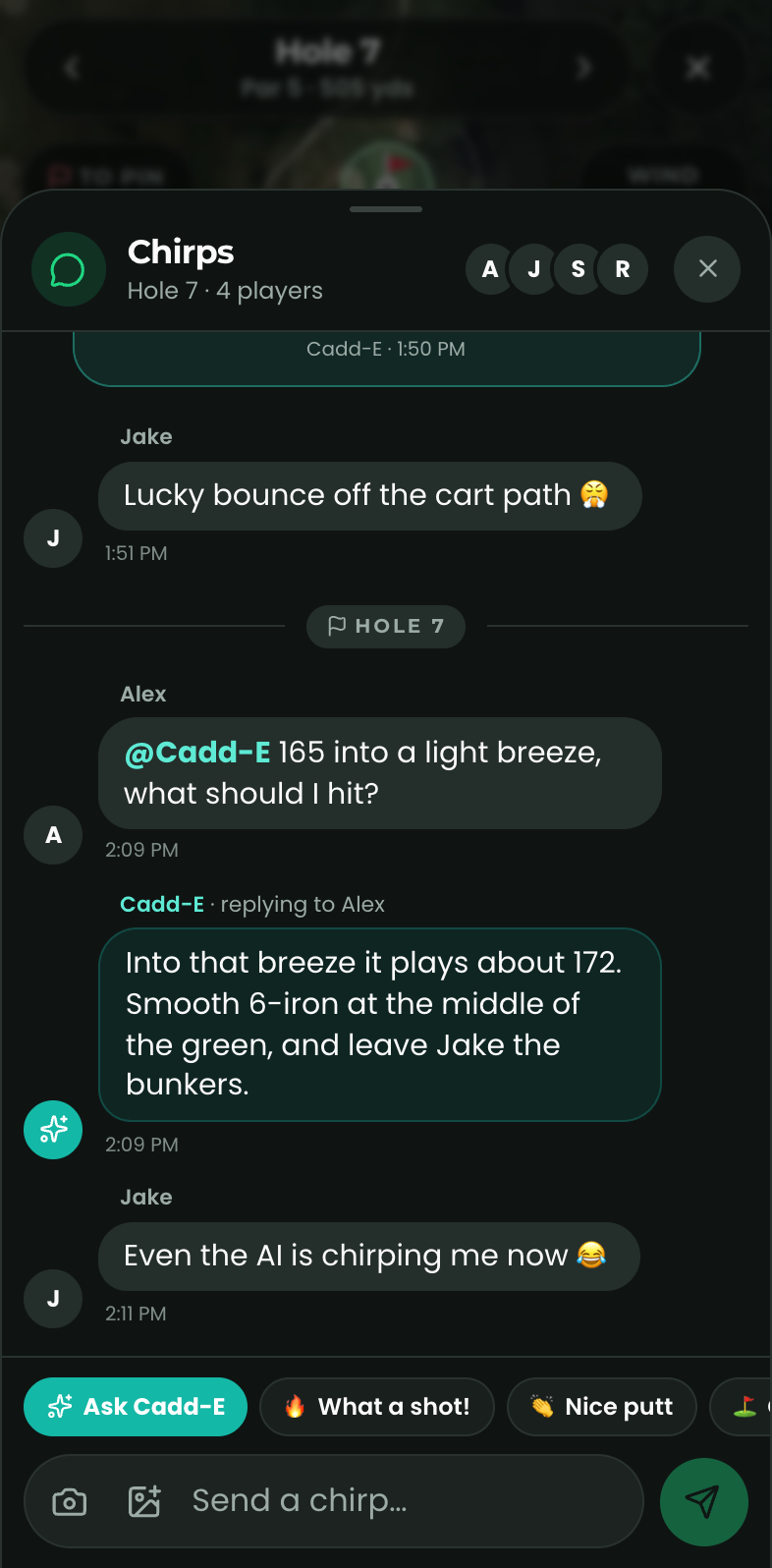
@Cadd-E in chirps
Mention @Cadd-E in your round’s group chat for a club call, strategy, or a ruling on who’s buying drinks.
Swing coach
After Swing Lab measures your swing on the phone, Cadd-E scores it, names the main fault and gives you drills.
On your watch
One tap on Apple Watch or Wear OS for a club, a shot shape and a one-line tip for where you’re standing.
How it works
Two brains: one on your phone, one in the cloud
The instant engine
Runs on your phone and watch
Every time your distance changes, ChirpNChip works out the plays-like yardage (wind, temperature, elevation, altitude) and picks the club in your bag that carries it. It uses rules of thumb tour caddies use, takes microseconds, and works with no signal. Nothing is sent anywhere.
Swing Lab’s body tracking also runs on the phone, frame by frame, so your video never leaves it.
The AI read
Claude, by Anthropic, only when you ask
When you tap Cadd-E, mention @Cadd-E, finish a Swing Lab analysis or ask from your watch, our server sends the details for that one question to Claude, Anthropic’s AI model, and returns its answer. Cadd-E builds on the instant engine’s numbers, adds judgment from the satellite view and your game, and only picks clubs you actually carry.
Under Anthropic’s commercial terms, the data we send isn’t used to train their models.
AI disclosure
Exactly what Cadd-E sees
Only what each answer needs, and only when you ask.
Shot read (map)
Sent to Cadd-E
- Hole number, par and yardage
- Distances, plays-like adjustments, wind and temperature
- Your handicap and the clubs in your bag with estimated carries
- A picture of the hole on the map, with where you, the pin and your target are
- Your score so far and the game mode
Never sent
- Your GPS coordinates
- Your name or contact details
@Cadd-E in chirps
Sent to Cadd-E
- The message that mentions Cadd-E
- The last few chirps in that round (photos and videos are left out)
- Names, handicaps and scores of the players in the round
- The hole you’re on and the clubs in your bag
Never sent
- Chirps from other rounds
- Photos and videos
Swing coach
Sent to Cadd-E
- The measurements from your swing (tempo, angles, speeds)
- A few still frames at key positions
- Camera angle, handedness and club, your handicap, and any notes you add
- Your previous session’s numbers, to track progress
Never sent
- Your swing video
- Anything from your camera roll
Watch
Sent to Cadd-E
- Hole details and your distance to the green
- Your handicap, clubs and score so far
Never sent
- Your GPS coordinates (our server works out the distance first)
Know its limits
Cadd-E’s answers are generated by AI and can be wrong. Distances, plays-like numbers and swing speeds are estimates. It only knows about hazards it can see on the satellite view. On the course, the call is always yours.
You’re in control
Cadd-E only speaks when you ask. Pick its voice in Settings (tour caddie, encouraging, by the numbers or best buddy). If you never tap Cadd-E or mention it, nothing goes to the AI.
Built to be a good sport
Cadd-E joins the trash talk but keeps it about golf, never about anyone’s looks, body or identity, and goes easy after a rough hole. It won’t make up scores or course facts it doesn’t have.
Questions about Cadd-E or your data? Read the Privacy Policy or email support@chirpnchip.com.